Freeze Rows and Columns
Freeze rows or columns is useful when displaying lots of data. Range
allows you to freeze rows and columns easily like:
1
2
3
4
5
//freeze first row and first column
range.setFreezePanel(1,1);

//unfreeze
range.setFreezePanel(0, 0);
This method accepts row and column number starting from 1 as a
parameter. Calling these methods will take effect on the sheet that
Range represents only. Passing 0 means to unfreeze it.
The screenshot below is the example application to demonstrate the API
usage. If we click “Freeze” button, it will freeze row and column
according to current selection. 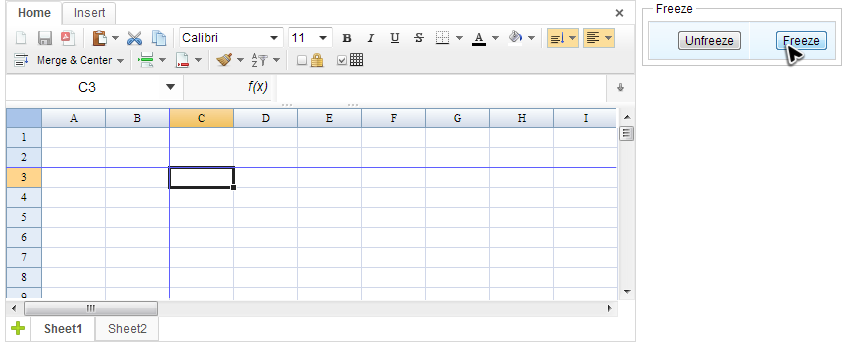
The code is like:
1
2
3
4
5
6
7
8
9
10
11
12
13
14
15
16
public class FreezeComposer extends SelectorComposer<Component> {

    @Wire
    private Spreadsheet ss;

    @Listen("onClick = #freezeButton")
    public void freeze() {
        Ranges.range(ss.getSelectedSheet())
        .setFreezePanel(ss.getSelection().getRow(), ss.getSelection().getColumn());
    }

    @Listen("onClick = #unfreezeButton")
    public void unfreeze() {
        Ranges.range(ss.getSelectedSheet()).setFreezePanel(0,0);
    }
}
Freeze panes with a scrolled origin
Prior to Keikai 7.0.0, setFreezePanel API freezes from the top-left corner.
since 7.0.0 Keikai supports frozen-corner offset, so a sheet frozen while scrolled to a given row and column imports and renders at the same position instead of being snapped back to first rows and columns.
When “Freeze Panes” is applied, two pieces of information describe the result: Keikai now carries the frozen-corner offset.
Excel: scroll to row 19, then "Freeze Panes" for 4 rows

   row 19  +----------------------+  <- frozen band starts here (origin)
   row 20  |   frozen rows        |
   row 21  |   (4 rows)           |
   row 22  +----------------------+
   row 23  |   scrollable area    |  <- content below scrolls under the band
           |                      |
The freeze anchors on SSheetViewInfo
The freeze state can be accessed on
io.keikai.model.SSheetViewInfo.
1
2
3
Sheet apiSheet = spreadsheet.getSelectedSheet();      // io.keikai.api.model.Sheet
SSheet sheet   = apiSheet.getInternalSheet();          // io.keikai.model.SSheet
SSheetViewInfo view = sheet.getViewInfo();             // io.keikai.model.SSheetViewInfo
Two pairs of accessors together describe the frozen region. The counts are pre-existing; the origin anchors are available (@since 7.0.0):
1
2
3
4
5
6
7
// How many rows / columns are frozen
int rowCount = view.getNumOfRowFreeze();
int colCount = view.getNumOfColumnFreeze();

// Where the frozen band starts, 0-based (new, @since 7.0.0):
int topRow  = view.getFreezeTopRow();     // row component of <sheetView topLeftCell>
int leftCol = view.getFreezeLeftColumn(); // column component of <sheetView topLeftCell>
The origin anchors have matching setters — setFreezeTopRow(int) and
setFreezeLeftColumn(int) — and both default to 0, which is the
ordinary top-anchored (unscrolled) freeze.
All indices are 0-based. The frozen region is a half-open interval that starts at the origin and extends by the count:
- Frozen rows span
[getFreezeTopRow(), getFreezeTopRow() + getNumOfRowFreeze()). - Frozen columns span
[getFreezeLeftColumn(), getFreezeLeftColumn() + getNumOfColumnFreeze()).
The scrollable area begins immediately after each interval — at row index getFreezeTopRow() + getNumOfRowFreeze() and column index
getFreezeLeftColumn() + getNumOfColumnFreeze().
Notes
- Indices are 0-based. Subtract 1 when mapping a 1-based UI row / column
number to
getFreezeTopRow()/getFreezeLeftColumn(), and add 1 going the other way. - Default origin is
(0, 0), the ordinary top-anchored freeze. Files frozen without scrolling — the common case — are unaffected.