How to Write Data to Excel in Java (List, Database, or JSON)
Turn Java records into a formatted Excel report without writing every data cell one by one. Axyra Sheets maps a list of objects to worksheet rows with importData(). Start with two records; add a header, number formats, and a formula total in the complete example below.
Minimal export — records only. This excerpt runs inside main; use the complete Java class for a runnable program and the formatted result below:
record Sale(String orderId, String product, double amount) {}
List<Sale> sales = List.of(
        new Sale("00042", "Laptop", 1250),
        new Sale("00043", "Mouse", 80));
try (Workbook wb = Workbook.create()) {
    Sheet sheet = wb.createSheet("Sales");
    sheet.importData(0, 0, sales, ImportOptions.builder()
            .columns("orderId", "product", "amount")
            .headers(true).build());
    wb.save(Path.of("sales.xlsx"));
}
The minimal example exports the records. The complete example below adds the formatting and formula shown here: readable column labels, a bold header, #,##0.00, and SUM(C2:C3).
| Order ID | Product | Amount |
|---|---|---|
| 00042 | Laptop | 1,250.00 |
| 00043 | Mouse | 80.00 |
| Total | 1,330.00 |
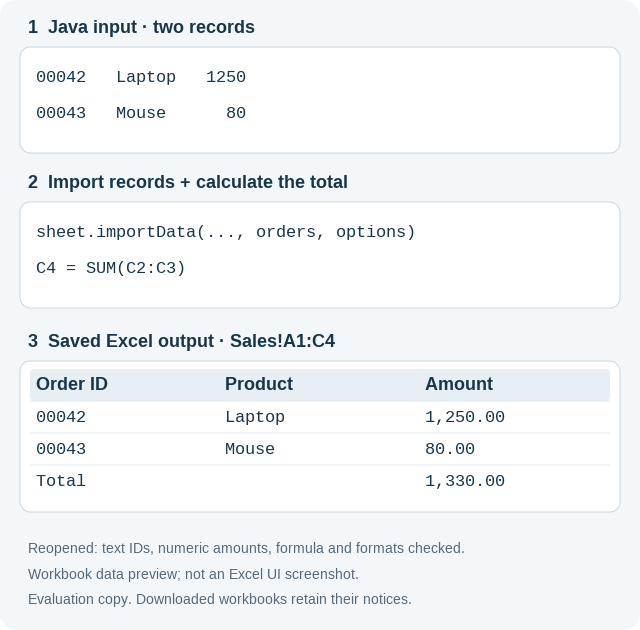
The figure and table show the complete example’s workbook: IDs stay text, amounts stay numeric, and C4 stores a formula. You can inspect the workbook and run the project before connecting a database.
Build your own Excel workflow with AI. Use the Axyra Agent Skill to generate, run, and verify Java code for your own Excel files or report requirements.
View source on GitHub · Run instructions
Run the complete example
Use Java 17+ and Maven; Microsoft Excel is not required. Clone the examples repository, enter this guide’s standalone project, and run:
git clone https://github.com/keikai/axyra-sheets-examples.git
cd axyra-sheets-examples/java/guide-projects/axyra-read-write
mvn -q compile exec:java -Dexec.mainClass=WriteExcelFile
The project includes its POM and creates the output directory. Evaluation needs no key and adds notices; production use requires a commercial license. Licensing details.
Complete Java class
Expand complete Java class and copy code
Full source: WriteExcelFile.java.
import io.keikai.axyra.sheets.CellValue;
import io.keikai.axyra.sheets.ImportOptions;
import io.keikai.axyra.sheets.Sheet;
import io.keikai.axyra.sheets.Workbook;
import io.keikai.axyra.sheets.style.CellStyle;
import java.nio.file.Files;
import java.nio.file.Path;
import java.util.List;

public final class WriteExcelFile {
    public record Sale(String orderId, String product, double amount) {}

    public static void main(String[] args) throws Exception {
        Path output = Path.of("output/sales.xlsx");
        Files.createDirectories(output.getParent());
        List<Sale> sales = List.of(
                new Sale("00042", "Laptop", 1250),
                new Sale("00043", "Mouse", 80));
        try (Workbook wb = Workbook.create()) {
            Sheet sheet = wb.createSheet("Sales");
            sheet.importData(0, 0, sales, ImportOptions.builder()
                    .columns("orderId", "product", "amount")
                    .headers(true)
                    .columnLabels("Order ID", "Product", "Amount")
                    .headerStyle(CellStyle.builder().bold().build())
                    .build());
            sheet.cell(3, 0).setValue(CellValue.text("Total"));
            sheet.cell(3, 2).setFormula("SUM(C2:C3)");
            sheet.range("C2:C4").setStyle(CellStyle.builder()
                    .numberFormat("#,##0.00").build());
            for (int c = 0; c < 3; c++) sheet.setColumnWidth(c, 18);
            wb.save(output);
        }
        System.out.println("Saved " + output);
    }
}The file is output/sales.xlsx. The column list fixes the schema; number formats control display while preserving numeric values. All formatting is applied before saving, inside the open workbook.
Already have a Maven project? Add the repository and dependency
<repositories>
  <repository>
    <id>keikai-eval</id>
    <url>https://mavensync.zkoss.org/eval</url>
  </repository>
</repositories>
<dependencies>
  <dependency>
    <groupId>io.keikai</groupId>
    <artifactId>axyra-sheets</artifactId>
    <version>1.0.0-Beta-Eval</version>
  </dependency>
</dependencies>
Target Java 17 or later. The project’s POM includes compiler and execution plugins. Gradle and supported platforms.
Generate an Excel report with AI
This new Codex run used the Axyra Agent Skill and the existing project to turn a short report request into an export. The prompt supplied input records, not the expected total.
Describe the report:
Use Axyra Sheets to export these orders to output/ai-sales-simple.xlsx:
(00042, Laptop, 1250), (00043, Mouse, 80). Keep IDs as text, format amounts
to two decimals, add bold headers and a SUM total. Build and run it,
then reopen and check the workbook.
Generated Java: SimpleSkillWriter.java derives the total row from the data. This is an excerpt:
int totalRow = sales.size() + 1;
sheet.cell(totalRow, 0).setValue(CellValue.text("Total"));
if (sales.isEmpty()) sheet.cell(totalRow, 2).setValue(CellValue.number(0));
else sheet.cell(totalRow, 2).setFormula("SUM(C2:C" + totalRow + ")");
Verified result: the saved workbook (output/ai-sales-simple.xlsx when generated locally) contains two order rows, text IDs, numeric amounts, bold headers, and a stored SUM formula. Reopening the workbook gave a displayed total of 1,330.00.
Reproduce this run: full context, source, and expected/actual results
The displayed prompt is the exact prompt for this new run. Codex had the installed skill, existing project and earlier examples in context; this was not a blind or timed trial. The project supplied Java 17 and Axyra Sheets 1.0.0-Beta-Eval.
The recorded run on GitHub includes the exact prompt, project context, complete generated source, the saved workbook, raw stdout/stderr, and a manifest with commands, exit codes, and file hashes. Reproduce both examples and their checks with:
mvn -q compile exec:java -Dexec.mainClass=SimpleSkillReader
mvn -q exec:java -Dexec.mainClass=SimpleSkillWriter
mvn -q exec:java -Dexec.mainClass=VerifySimpleSkill
The verifier calculated its expected total from the input records, then compared it with the read and saved workbook values. Its recorded output was:
Reader total: expected 1330.00; actual 1330.00
Saved total: expected 1330.00; actual 1330.00
Stored formula: SUM(C2:C3); displayed total: 1,330.00
PASS: text IDs, Java records, numeric amounts, bold headers, and formats
The expected/actual comparison retains the detailed checks. The earlier long-prompt run is also available.
For your own report, install the Axyra Sheets skill in a supported assistant. It guides development and is not a runtime dependency; compile and inspect each adaptation.
Adjust row counts, formats, and formulas
More or fewer records. The first complete program is a fixed two-row fixture. For variable-length input, derive the total row from list size and extend its number-format range. The generated SimpleSkillWriter.write(…) implementation does this and uses a numeric zero total for an empty list.
Dates and financial amounts. importData writes Java dates as Excel serials; apply a date format such as yyyy-mm-dd to display them as dates. Excel numeric cells use floating-point values, so define source precision and rounding rules for financial data.
Calculated totals. Store formula source with setFormula("SUM(C2:C3)"), without a leading =. Normal edits update dependent formulas; for manual calculation or untrusted input caches, recalculate before saving and verify the reopened result.
Continue with a template, database, or JSON
Choose the next report workflow:
- Fill an existing Excel template — fill a Profit and Loss template from database totals while keeping its labels, formats, and profit formulas. Java supplies the monthly values. For repeating detail rows, see the template report guide.
- Generate a report from a database — query the source data and export a formatted workbook.
Database or JSON input. Map the source into records, then use the same bulk-writing path. The GitHub project includes DatabaseSalesReport.java and WriteJsonSalesReport.java for a four-column schema with dates. Their saved outputs were reopened to check date and amount formats. The JSON example registers Jackson’s Java time module; the POM includes it.
A large forward-only export. Consider StreamWorkbook when you should not hold all records in a list. It does not calculate formulas or edit an existing workbook. Maps, numeric matrices, and explicit typed blocks are covered in the advanced writing notes and the cell and range reference.
Troubleshooting and FAQ
Why do dates display as numbers? Date imports need a date number format; apply it before saving. The dated examples show the complete sequence.
Why are columns missing or reordered? Set .columns(...) explicitly. Property names are strings and are checked at runtime; adding a field should not silently change your export schema.
Need to read or update the output? The paired reading guide opens the same sales workbook, changes an amount, and verifies the new total after saving.
Explore more with Axyra
Try these live demos to continue from this export:
- Reporting pipeline — explore a complete reporting workflow.
- Financial reporting — explore a financial report use case.