How to Read an Excel File in Java (XLSX Example)
Read an Excel worksheet and print its rows with a few Java API calls. This Axyra Sheets example keeps order ID 00042 as text and reads the formula total as a number. The same workbook API can then update an amount, recalculate, and save the file.
Quick excerpt: this uses text() from the complete runnable class below. Copy that class to run the example.
try (Workbook wb = Workbook.open(Path.of("input/sales.xlsx"))) {
    Sheet sheet = wb.sheet("Sales");
    for (CellValue[] row : sheet.range("A1:C4").values()) {
        System.out.printf("%s\t%s\t%s%n",
                text(row[0]), text(row[1]), text(row[2]));
    }
}
The complete class below supplies the imports and text() helper. It prints the sample workbook’s business region, including its header and total:
Order ID   Product   Amount
00042      Laptop    1250.0
00043      Mouse     80.0
Total                1330.0
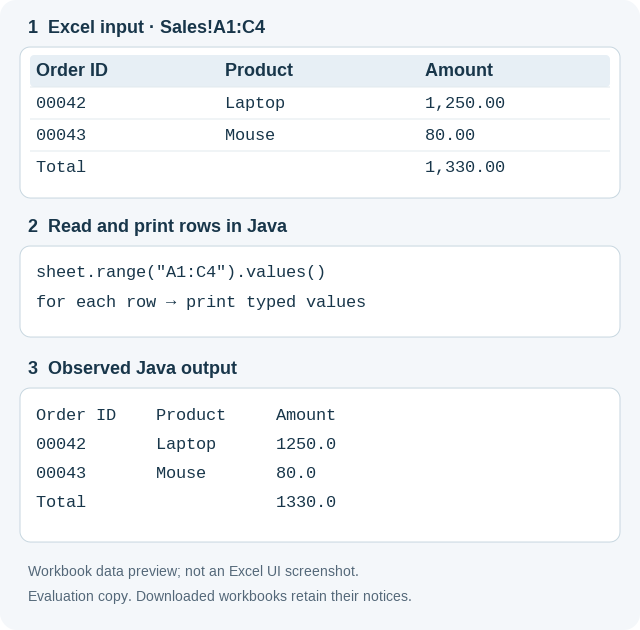
The figure previews actual workbook cells and recorded output. The sample’s range is A1:C4; see unknown row counts for other layouts.
Build your own Excel workflow with AI. Use the Axyra Agent Skill to generate, run, and verify Java code for your own Excel files or report requirements.
View source on GitHub · Run instructions
Run the complete example
Use Java 17+ and Maven; Microsoft Excel is not required. Clone the examples repository, enter this guide’s standalone project, and run:
git clone https://github.com/keikai/axyra-sheets-examples.git
cd axyra-sheets-examples/java/guide-projects/axyra-read-write
mvn -q compile exec:java -Dexec.mainClass=ReadExcelFile
The project includes the sample workbook and complete POM. Evaluation needs no key and adds notices; production use requires a commercial license. Licensing details.
Complete Java class
Expand complete Java class and copy code
Full source: ReadExcelFile.java.
import io.keikai.axyra.sheets.CellValue;
import io.keikai.axyra.sheets.Sheet;
import io.keikai.axyra.sheets.Workbook;
import java.nio.file.Path;

public final class ReadExcelFile {
    public static void main(String[] args) {
        Path input = Path.of(args.length == 0 ? "input/sales.xlsx" : args[0]);
        try (Workbook wb = Workbook.open(input)) {
            Sheet sheet = wb.sheet("Sales");
            for (CellValue[] row : sheet.range("A1:C4").values()) {
                System.out.printf("%s\t%s\t%s%n",
                        text(row[0]), text(row[1]), text(row[2]));
            }
        }
    }

    private static String text(CellValue value) {
        if (value instanceof CellValue.Text t) return t.value();
        if (value instanceof CellValue.Number n) return String.valueOf(n.value());
        if (value instanceof CellValue.Bool b) return String.valueOf(b.value());
        if (value instanceof CellValue.Error e) return e.display();
        if (value instanceof CellValue.Array) return "[array]";
        return "";
    }
}To use another workbook with the same layout, add -Dexec.args="/path/to/file.xlsx". For a different layout, change the "Sales" sheet name and the range too.
Already have a Maven project? Add the repository and dependency
<repositories>
  <repository>
    <id>keikai-eval</id>
    <url>https://mavensync.zkoss.org/eval</url>
  </repository>
</repositories>
<dependencies>
  <dependency>
    <groupId>io.keikai</groupId>
    <artifactId>axyra-sheets</artifactId>
    <version>1.0.0-Beta-Eval</version>
  </dependency>
</dependencies>
Target Java 17 or later. The project’s POM includes compiler and execution plugins. Gradle and supported platforms.
Read Excel into Java records with AI
Here is a new Codex run using the Axyra Agent Skill and the existing sample project. The short prompt below did not supply the expected total.
Describe the task:
Use Axyra Sheets to read the Sales worksheet in input/sales.xlsx into Java
order records. Preserve IDs like 00042, skip blank rows, and show the orders
and the workbook total. Build and run it, then check against the workbook.
Generated Java: SimpleSkillReader.java converts each order row into an Order record. This excerpt also identifies the sample table’s footer:
if (id.equals("Total")) {
    return new Report(List.copyOf(orders), number(row[2]));
}
orders.add(new Order(id, text(row[1]), number(row[2])));
Actual output after building and running:
00042 | Laptop | 1250.00
00043 | Mouse | 80.00
Workbook total = 1330.00
Reproduce this run: full context, source, and checks
The displayed prompt is the exact prompt for this new run. Codex had the installed skill, existing project and earlier examples in context; this was not a blind or timed trial. The project supplied Java 17 and Axyra Sheets 1.0.0-Beta-Eval.
The recorded run on GitHub contains the exact prompt, project context, complete generated source, raw stdout/stderr, and a manifest with commands, exit codes, and file hashes. The reader expects the workbook’s Order ID / Product / Amount headers and a Total footer; adapt that contract for other layouts.
mvn -q compile exec:java -Dexec.mainClass=SimpleSkillReader
The separate verification run compared the extracted records and total with the workbook and source data. The expected/actual comparison keeps the checked values; the earlier long-prompt run is also available.
To adapt your own workbook, install the Axyra Sheets skill in a supported assistant. The skill guides development and is not required at runtime; build and verify each adaptation.
Common reading scenarios
Unknown row count or empty worksheet. Inside the open workbook, use:
var used = sheet.usedRange();
if (used != null) {
    CellValue[][] rows = used.values();
    // Validate headers, identify business rows, then process them.
}
A used range may include totals, formatting, or evaluation notices. It is not automatically a list of valid records. The recorded AI reader uses a Total footer to identify the end of its sample table.
Dates, display text, and formulas. Use the value your application needs:
| Need | API |
|---|---|
| Raw text, numbers, blanks, and error values | range.values() |
| Displayed currency or number text | cell.formattedText() |
An Excel date converted to LocalDate |
cell.dateValue() |
| Formula expressions | range.formulas() |
Dates are stored as serial numbers. Formula results can come from saved caches; call wb.recalculate() before reading when those caches may be stale. A CellValue.Error should be reported or rejected according to your import rules, rather than silently converted to zero.
Uploaded file or a larger workbook. Use Workbook.open(in, "xlsx") for an input stream or Workbook.openBytes(bytes, "xlsx") for bytes, inside try-with-resources. For bounded processing, follow the large Excel reading guide. The GitHub project includes ReadAllWorksheets.java for diagnostic scans and advanced reading notes; it is optional for this first example.
Continue: update, calculate, and save
Suppose the first order amount changes from 1250 to 1500. The workbook already contains SUM(C2:C3), so the same API can return a corrected report:
try (Workbook wb = Workbook.open(Path.of("input/sales.xlsx"))) {
    Sheet sales = wb.sheet("Sales");
    sales.cell(1, 2).setValue(CellValue.number(1500));
    wb.recalculate();
    System.out.println(sales.cell(3, 2).formattedText()); // 1,580.00
    wb.save(Path.of("sales-updated.xlsx"));
}
UpdateSalesReport.java runs this change and reopens the file to verify the saved total of 1580. See the paired guide to writing Java data to Excel.
Troubleshooting and FAQ
Why did 00042 lose its zeros? The source cell must contain text. Reading a numeric cell cannot recover leading zeros that were never stored as text; use formattedText() when you need a numeric cell’s displayed representation.
Why is access failing after the method returns? Sheet and Range belong to their open workbook. Return extracted Java values and close the workbook after extraction.
Need to import business records? Validate required headers and values before persistence. Continue with Excel-to-database validation or the cell and range reference.
Explore more with Axyra
Continue with a related workflow:
- Import Excel to a database with validation — validate headers and business values before saving records.
- Modify, recalculate, and save Excel — change an amount and verify the saved formula total.
Try the live demos:
- Financial data cleansing — explore a validation and cleansing workflow.
- Formulas and recalculation — explore calculated workbook results.