Fill an Excel Template with Java Data Using Axyra Agent Skill
You already have an Excel report template with the layout, formulas, and formatting your team needs. Now you want to populate it with Java data without writing the report layout from scratch.
This tutorial shows how to use an AI coding assistant with the Axyra Agent Skill to build that workflow. You provide a sales template and three sample order records; the assistant writes, runs, and checks a Java program that generates the completed report. You then review the workbook and verification results.
The Skill guides development; the finished Java program uses Axyra Sheets to generate subsequent reports.
TL;DR
- You supply an Excel template, representative Java records, and the required report output.
- Ask your coding assistant to use the Axyra Agent Skill to write, compile, and run the program.
TemplateMarkers.process()fills markers and repeats the formatted detail row;wb.recalculate()calculates the row formulas.- The example produces three order rows with a total of USD 394.00. You review the workbook and the assistant’s check summary.
Table of contents
- From Excel template to completed report
- Get started with the template example
- Give the assistant your template and data
- How the generated Java code works
- Run the example and review the result
- Best practices for reliable Excel reports
From Excel template to completed report
Before: template structure
In ${lines.sku}, lines names the Java collection and sku names a field on each record. A template row containing list markers expands once per record, carrying its formatting and relative formulas into the generated rows. Scalar markers such as ${customer} fill a single value.
The supplied workbook uses an Invoice worksheet with the following cells. Formula text is shown directly in this template map.
| Cell | Template content |
|---|---|
| B2 | ${customer} |
| B3 | ${period} |
| A5 | ${lines.sku} |
| B5 | ${lines.product} |
| C5 | ${lines.qty} |
| D5 | ${lines.unitPrice} |
| E5 | =C5*D5 |
| D6 | Total (USD) |
| E6 | ${lines.amount:sum} |
After: completed report
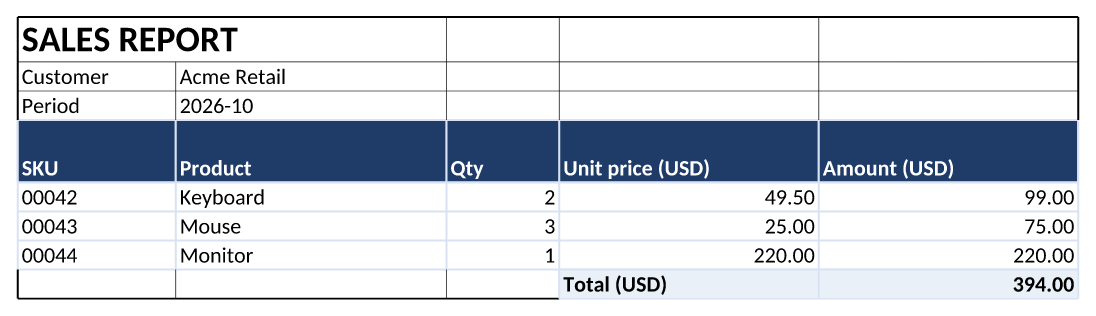
The three detail amounts are 99.00, 75.00, and 220.00; the total is 394.00. The preview comes from the generated workbook.
Try the Excel template example
Get started with the template example
Clone the examples repository and open java/guide-projects/template-report in your coding assistant. It contains the prepared template, Java records, runnable reference implementation, and expected output. Use Java 17+ and Maven.
git clone https://github.com/keikai/axyra-sheets-examples.git
cd axyra-sheets-examples/java/guide-projects/template-report
Install the Axyra Agent Skill:
npx skills add https://github.com/keikai/doc/tree/master/skills/axyra-sheets
Skill setup · Java dependency setup · Input workbook
The public POM defaults to the evaluation dependency; the ee Maven profile selects Axyra Sheets 1.0.0-Beta, the non-Eval build used with an active license for the reference checks. See the project’s run instructions for repository credentials and license setup.
The Skill guides development; the finished Java program runs with Axyra Sheets. Instead of finding the APIs and implementing row expansion yourself, you can ask the assistant to build and verify the workflow against your template.
Give the assistant your template and data
- You provide
input/sales-template.xlsx, sample records, and the report requirements. - The assistant writes the Java program, runs it, and checks the saved workbook.
- You review the completed report and the assistant’s result summary.
With the project open in your coding assistant, provide the template file and paste the following prompt to ask it to generate and check the Java program.
Use the Axyra Agent Skill with this Java 17 Maven project.
Fill input/sales-template.xlsx, worksheet Invoice.

Use customer Acme Retail and period 2026-10, with these lines:
00042 / Keyboard / 2 / 49.50
00043 / Mouse / 3 / 25.00
00044 / Monitor / 1 / 220.00
Derive each amount from quantity times unit price.

Use the existing markers to repeat the formatted detail row.
Preserve text SKUs, number formats, and relative formulas.
Keep the input template; write output/acme-sales.xlsx.

Compile and run the program. Check expected report values,
formulas, and the total of 394.00. Test one and zero records,
rejecting an empty list. Return source, the workbook,
and a summary of completed checks.
How the generated Java code works
After you submit the prompt, the assistant writes the Java program. The tested reference excerpt below shows the expected core: one TemplateMarkers.process() call binds Java records and expands the formatted detail row. The project contains the complete class.
try (Workbook wb = Workbook.open(input)) {
    Map<String, Object> data = Map.of(
            "customer", "Acme Retail",
            "period", "2026-10",
            "lines", lines);

    TemplateMarkers.process(wb.sheet("Invoice"), data);
    wb.recalculate();
    wb.save(output);
}
Each detail Amount remains an Excel formula: C5*D5, C6*D6, and C7*D7. The ${lines.amount:sum} marker instead sums the Java records’ amount fields and writes the numeric value 394.00 into the total cell, now E8. Editing a detail value in the delivered workbook therefore recalculates its line formula, but does not automatically update that numeric total. If recipients need an editable total, ask the assistant to write and verify a SUM formula covering the generated detail rows.
Complete Java source · Template Markers reference
Run the example and review the result
The prompt asks your assistant to compile, run, and check its implementation. To reproduce the tested reference run yourself, execute:
mvn compile exec:java -Dexec.mainClass=FillReportTemplate
mvn exec:java -Dexec.mainClass=TemplateCases
The reference run produced output/acme-sales.xlsx and verified the customer, period, text SKUs, products, numeric fields, detail formulas, money formats, and total. One-record and empty-input cases also passed.
Completed workbook · Detailed verification results · Full prompt
Best practices for reliable Excel reports
- Keep identifiers such as SKUs as text; use numeric fields for quantities and prices.
- Format the template row before processing, then verify representative input data.
Try the complete example with your own Excel template: clone the project, install the Axyra Agent Skill, and ask your coding assistant to generate and check your report.
Try the Excel Template Example
For an API-focused walkthrough, see Automate Excel Reports in Java with Templates.